myORCA
- 3.0
- Rating
- 100.00K
- Installs
- Free
- Price

 Analysis by App-foxy
Managing a transit card is usually the sort of task I want to finish in a few seconds, preferably before a bus arrives. That is where myORCA makes a convincing case for itself. Developed by myORCA and listed in Travel & Local, this free app puts everyday ORCA card management on a phone instead of making me rely on a website, a kiosk, or a separate trip to a service point. My overall view is positive but measured: it is most useful as a practical companion for existing ORCA users, not as a complete replacement for every transit tool.
I tested it with that distinction in mind. The app’s purpose is narrow, and that is actually one of its strengths. It is not trying to become a general travel planner, a social platform, or an all-purpose map. Its job is to help me handle my card while I am away from a computer. When that is exactly what I need, the focused design feels sensible. When I want broader journey planning or a richer view of the whole trip, I still find myself reaching for a conventional maps or transit app.
What using myORCA feels like in daily travel
The first useful change is psychological: I can check and manage my transit card from the same device I already carry. That matters most during ordinary moments rather than dramatic ones. I might be leaving work, checking whether my card is ready for the evening commute, or dealing with a balance question while standing near a stop. In those situations, opening a dedicated card-management app is more direct than navigating a general transit service.
You May Also Like

 Blood Strike: 2.5 Anniversary
Blood Strike’s Loadouts Turn Every Drop Into a Tactical Gamble
A close look at Blood Strike’s custom loadouts: how fast access to signature weapons reshapes its battle royale rhythm, rewards preparation, and narrows the gap between fights.

 Pandora - Music & Podcasts
Pandora’s Music Is Easy to Start, but Harder to Recover
Pandora’s strength is its low-effort path from a seed to a station. Its weak spot is how much confidence it asks you to place in connection, setup, and quiet recovery.

 8 Ball Pool
8 Ball Pool Is Built on Rivalries, Rematches, and Routine
A close look at the rivalries, rematches, shared routines, and unanswered safety questions that turn a quick pool match into a persistent mobile community.

 Samsung Music
Samsung Music’s Quiet Strength Is Playing What You Already Own
Its reach comes less from spectacle than from dependable access to a personal library. That simplicity is both the app’s strongest retention engine and its ceiling.

 AccuWeather: Weather Radar
AccuWeather Review: A Quick, Clear Forecast for Everyday Decisions
For everyday plans, the best forecast is the one you can understand quickly. AccuWeather makes rain timing, radar, and local conditions easy to act on, with a few trade-offs.

 Hill Climb Racing
Why Hill Climb Racing Still Turns Crashes Into One More Run
A tiny car, a bumpy hill and one more upgrade: Hill Climb Racing keeps resurfacing because its simple chaos makes every near-miss feel personal.
More From Our News Desk



The experience is also easier to understand when I think of it as a personal account tool rather than a route-finding tool. I would not open it first to decide which bus or train to take. I would open it to deal with the ORCA side of that journey. Keeping those roles separate prevents a common mistake: expecting the app to replace every other travel application on the phone.
That focused role gives the app a practical advantage over the usual alternatives. A mobile browser can reach an account page, but a dedicated app generally makes repeated access feel less like an administrative chore. A station machine can be useful when I am already there, but it is not available when I am at home or halfway through a trip. A general transit app can show routes and arrival information, yet it is not designed around the details of one person’s ORCA card.
I also appreciate that the app is free and carries an Everyone content rating. Those details make it approachable for households where several people use public transport, including younger users who need a straightforward way to stay involved in their travel routine. The app was released on May 10, 2022, and its current version is 1.7.4, with support beginning at Android 5.0. That broad Android compatibility makes it relevant to people who keep an older phone rather than upgrading for every new app.
There is a useful trade-off here. Supporting older Android versions can help more people install the app, but it also means I would not assume that every phone presents the interface in exactly the same way. On an older device, I would keep expectations realistic about speed and screen layout. The app’s value comes from access to card management, not from demanding modern visual effects or a large feature set.
The small workflow choices that make it more useful
My first suggestion is to set up access before the day you urgently need it. That sounds obvious, but a transit account is most valuable when the phone is already prepared. I would install the app at home, sign in or connect the relevant card details, and make sure I understand where the important account information appears. Doing that in a calm moment avoids turning a crowded platform into a setup desk.
A second tip is to use the app as a checkpoint before leaving, not only as an emergency tool. For example, on a weekday morning I might check my ORCA information while making coffee, then leave knowing whether I need to deal with the card before boarding. This is a better habit than waiting until the reader or station machine forces the issue. The app cannot remove every transit uncertainty, but it can move some of the checking earlier in the routine.
A third insight is that the app works best when paired with, rather than substituted for, other travel tools. I would use a maps or transit app for route choices and arrival planning, then use myORCA for the card-specific part of the trip. That division keeps each app doing what it is good at. Trying to make one tool handle both jobs can create unnecessary searching and make the overall journey feel more complicated.
There is also a household use case that is easy to overlook. If a family member manages travel for another person, a dedicated ORCA app can provide a more organized place to handle card-related tasks than a collection of browser tabs. I would still be careful about whose account is active before making any change. The convenience of having several cards or users nearby on one phone can become a source of confusion if I do not pause and verify the selected account.
For commuters, the strongest benefit is repetition. A person who uses ORCA regularly gains more from quick, familiar access than someone who only takes public transport once in a while. The app becomes part of a routine: check, travel, and return to it when card management is needed. Occasional visitors may find a general travel app and a physical service option sufficient, especially if they do not expect to manage the same card repeatedly.
Where the focused design falls short
The same narrow purpose that makes myORCA straightforward also limits it. I would not choose it as my only travel application. If I need a route from one address to another, want to compare different modes, or need broader navigation context, I am better served by a dedicated journey planner or maps app. The card-management focus is useful, but it should not be mistaken for a full local-transit command center.
That separation can create a little friction. A complete trip may involve switching between apps: one for the route, one for the card, and perhaps another for a calendar or destination. For experienced commuters, that is manageable. For a visitor or a person already feeling rushed, it may feel like too many pieces. I would recommend setting up the tools together and keeping the roles clear rather than expecting myORCA to answer questions it was not built to answer.
The app’s public reception also suggests a reason to keep expectations balanced. It has an average rating of 3.0 from around 400 ratings, alongside over 200 written reviews. I read that as a sign that the app is useful to some people but not universally smooth or complete. A middling rating does not make it a poor choice, especially for a narrowly defined task, but it does argue against treating it as flawless or indispensable.
Another limitation is the nature of account-based tools themselves. The app’s usefulness depends on having the right card or account information available and on being able to access the service when needed. I would not make it my only backup during an important journey. Keeping the physical card available and knowing where a service machine or staffed option is located remains sensible. Digital convenience is valuable, but transit plans benefit from a fallback.
I also think the app is less compelling for people who rarely change or inspect their card information. If someone simply taps a card and almost never needs to manage it, installing another application may not improve the experience much. The strongest case is for users who want regular access to their ORCA details and prefer handling those tasks from a phone.
Who should install it, and who should look elsewhere
I would recommend myORCA to a regular ORCA rider who wants a direct way to manage the card away from a desktop. It is especially suitable for someone whose commute makes card checks part of a weekly routine. The free price removes a financial barrier, and the Everyone rating makes it reasonable to consider for a broad range of users. The app has passed 100K installs, which also shows that it has found a meaningful audience beyond a handful of early adopters.
I would be more cautious with a traveler who is new to the area and mainly needs directions. That person should start with a strong maps or public-transit planner and add myORCA only if card management becomes part of the trip. The app can support the payment-card side of travel, but it is not the first tool I would hand to someone asking, “How do I get there?”
It is also a reasonable option for Android users with older hardware. Because the minimum operating system is Android 5.0, the app is not restricted to recent phones. I would still update the phone where possible and allow time for setup, particularly if the device is slow or storage is tight. The broad compatibility is helpful, but it does not turn an older handset into a modern navigation device.
For people who prefer handling everything through a browser, the decision is less clear. A browser can reduce the number of installed apps and may fit a minimalist phone setup. I personally prefer the dedicated app when I expect to check the card repeatedly, because a known icon and a focused destination are easier to reach than a saved page buried among tabs. The better choice depends on whether convenience of repeated access matters more than keeping the phone uncluttered.
Privacy-conscious users may also want to think about their own comfort with keeping a transit account on a mobile device. I would use a screen lock, avoid leaving the app open on a shared phone, and check the active account before changing anything. Those are sensible habits for any account-management application, but they matter particularly when a phone is used by more than one person in a household.
How it compares with the usual alternatives
Compared with a station kiosk, myORCA wins on timing. I can deal with card information before reaching the station and do not need to wait for a machine. The kiosk still has an important advantage: it is a physical fallback when the phone is unavailable, the battery is low, or I prefer not to handle the account digitally. I see the app and the kiosk as complementary rather than competing solutions.
Compared with a mobile browser, the app offers a more dedicated experience for repeated use. A browser may be perfectly adequate for an occasional check, while myORCA makes more sense when I want card management to have its own place on the phone. The trade-off is another installation and another account-related application to maintain. For a frequent rider, that is a fair exchange; for a rare rider, it may not be.
Compared with general transit apps, myORCA is narrower but more relevant to the ORCA account itself. A route planner can tell me how to travel, while this app is aimed at managing the card that supports that travel. Neither fully replaces the other. The best setup is usually a small combination: use the route tool for movement through the city and use myORCA for card administration.
That comparison explains my central criticism as well as my main praise. The app is not weak because it lacks every feature found in a maps application; it is simply built around a different problem. It becomes disappointing only when I install it expecting a single app to plan, navigate, and manage the entire journey. Used within its proper limits, the focused approach is more of a benefit than a flaw.
My final recommendation after living with it
MyORCA is a practical, specialized Travel & Local app that earns its place on the phone of a regular ORCA user. I like the convenience of having card management available during the ordinary moments when a browser or kiosk feels unnecessarily distant. I also like that the app is free, broadly accessible on Android, and simple enough to understand as a dedicated tool rather than another oversized travel platform.
My recommendation comes with one clear condition: install it for the card, not for the whole journey. Keep a separate route-planning option for directions and arrival information, and keep the physical card or another backup available for important trips. That approach avoids the app’s biggest weakness while preserving its strongest advantage.
With a current version of 1.7.4 and a public rating that sits at a moderate 3.0, I would describe it as useful rather than exceptional. It may not satisfy everyone, and the mixed reception is a good reason to approach it with realistic expectations. Still, for the person who regularly asks, “What is happening with my ORCA card?” the answer is likely worth having close at hand. If your daily travel includes recurring card management, myORCA is a sensible convenience; if you only need directions, choose a broader transit tool instead.
FAQs for myORCA
01What is myORCA, and what can I use it for?
myORCA is the official mobile companion for the ORCA transit card system in the Puget Sound region. After installing it, you can check your card balance, view recent activity, add value, purchase passes, and manage certain card details from your phone. It is designed for riders using participating public transportation services, including buses, trains, ferries, and other regional transit options that accept ORCA.
02Can I add my existing ORCA card to the myORCA app?
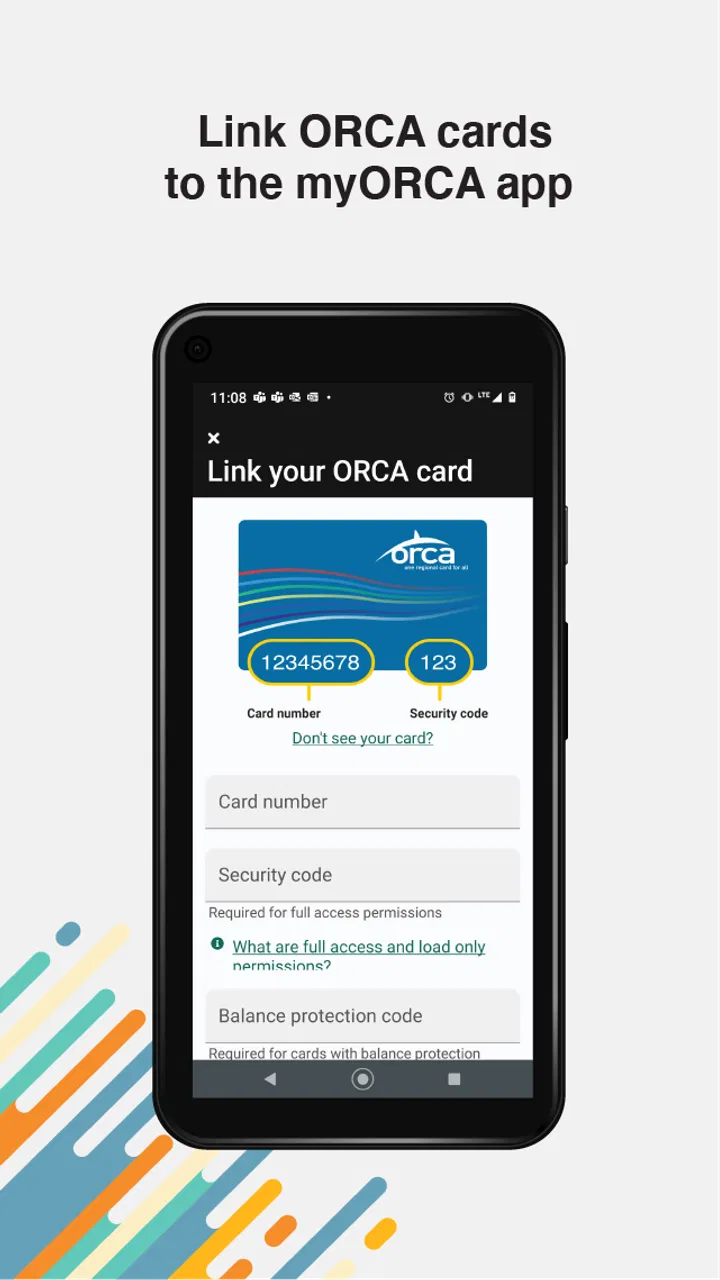
Yes, the app allows you to connect an existing ORCA card so you can manage it from your mobile device. You generally need the card information and may be asked to sign in or create an account. Once linked, the app can display balance and transaction details and provide options for adding funds or products. Keep your physical card available, since the app does not always replace every function of the plastic card.
03Can I use my phone as an ORCA card with myORCA?
myORCA may support mobile ticketing or digital transit credentials depending on the device, operating system, account setup, and current regional transit policies. Availability can vary, so users should check the app’s latest instructions before relying on a phone alone for travel. In some situations, a physical ORCA card may still be required, particularly when transferring between services or using features not supported by the mobile version.
04How quickly do added funds or purchased passes appear on my ORCA account?
The time required for a payment, balance reload, or pass purchase to become available can depend on the transaction type, payment processing, internet connection, and the transit agency’s systems. Some updates may appear quickly, while others can take longer to become usable on a card or device. It is best to add value before traveling rather than waiting until the last moment, and to confirm the updated balance in the app.
05Is myORCA free, and are there any extra costs to be aware of?
The myORCA app itself is generally available as a free download, but using it does not make transit free. You still pay the applicable fare, pass price, or card reload amount, and your payment provider may apply its own policies. Before confirming a purchase, review the total shown in the app. Also remember that mobile data charges, account requirements, and fare rules may vary depending on your carrier and transit service.
Pros
- Real-time balance and transaction history make fare tracking convenient.
- Supports quick card top-ups without visiting a ticket machine.
- Useful service updates help riders stay informed about disruptions.
- Simple interface makes essential ORCA functions easy to find.
- Digital access reduces the need to carry printed receipts or schedules.
Cons
- Some features may require an ORCA card or account to work fully.
- Balance and transaction updates may not appear instantly after a purchase.
- The app is mainly useful for riders in the ORCA service area.
- Occasional login or connection issues can interrupt account access.
- Not all transit agencies or fare products may be available in the app.

myORCA
Gallery